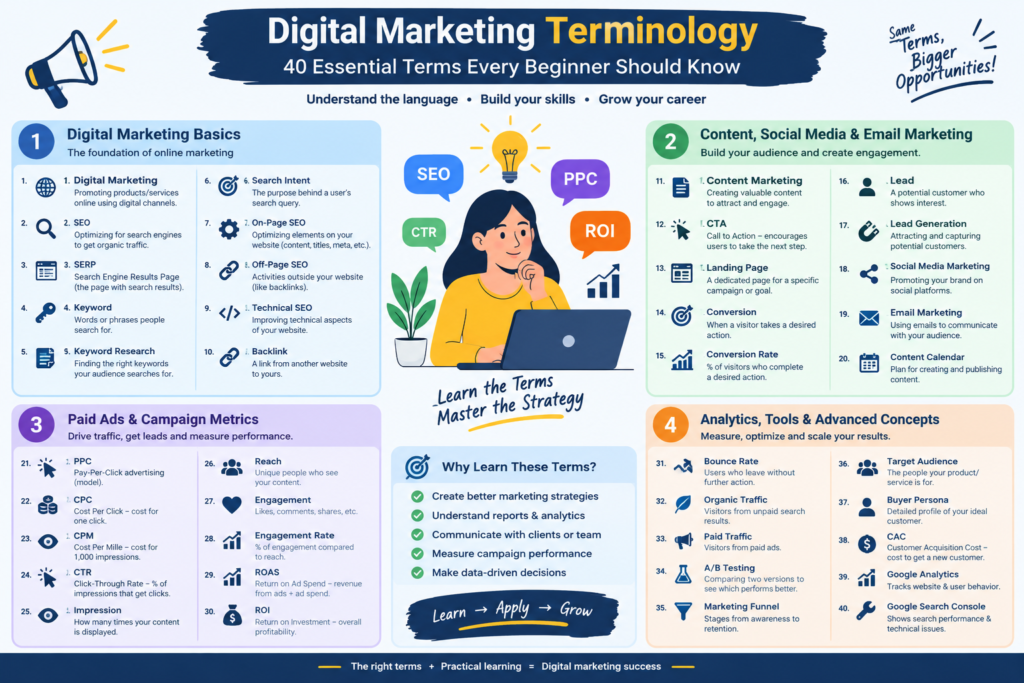
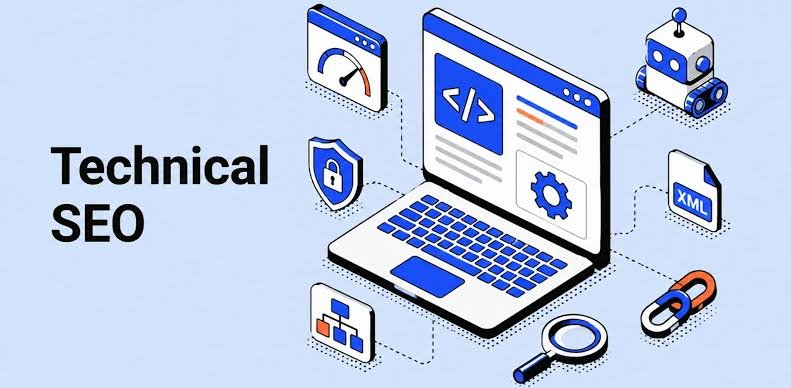
technical seo

Technical SEO: A Complete Beginner’s Guide to Website Optimization

Introduction Search engine optimization is not only about keywords and content. A website can have excellent articles and valuable information, but if search engines cannot properly crawl, understand, or index the website, achieving strong organic visibility can become difficult. This is where Technical SEO becomes important. Technical SEO is the process of improving the technical structure and performance of a website so that search engines can crawl, interpret, index, and potentially rank its pages more effectively. For beginners, Technical SEO may sound complicated. Terms such as crawling, indexing, canonical tags, XML sitemaps, robots.txt, redirects, structured data, and Core Web Vitals can initially feel overwhelming. The good news is that you do not need to be an expert developer to understand the fundamentals. In this guide, we will explain Technical SEO in simple language and cover the most important areas you should know. What Is Technical SEO? Technical SEO refers to the optimization of the technical aspects of a website that affect search engine crawling, indexing, performance, security, and accessibility. The main purpose is to make your website easier for: Search engines to crawl Search engines to understand Search engines to index Users to navigate Browsers to load Technical SEO works alongside other areas of SEO. A complete SEO strategy usually includes: Technical SEO On-Page SEO Off-Page SEO Technical SEO focuses on the technical foundation of your website. On-Page SEO focuses on elements such as: Content Keywords Titles Headings Internal links Meta descriptions Off-Page SEO focuses largely on signals outside your website, such as links and brand mentions. Why Is Technical SEO Important? Imagine that you create a high-quality blog post. You spend hours researching the topic and writing useful content. But your website has technical problems that prevent search engines from discovering or indexing the page properly. Your excellent content may receive very little organic visibility. Technical SEO helps reduce these problems. A technically healthy website can provide a better foundation for: Search engine crawling Indexing User experience Website performance Mobile usability Security Search visibility Technical SEO does not guarantee rankings. Search engines consider many factors when determining search results. However, technical problems can make it harder for your content to perform. Technical SEO vs On-Page SEO These two areas are related but different. Technical SEO On-Page SEO Website speed Content quality Crawling Keyword usage Indexing Title tags XML sitemap Headings Robots.txt Meta descriptions HTTPS Internal links Mobile usability Content structure Canonical URLs Search intent Structured data Image optimization A successful website needs both a strong technical foundation and useful content. How Search Engines Discover Your Website Before understanding Technical SEO, it helps to understand how search engines generally work. Search engines use automated systems to discover and process web pages. Three important concepts are: Crawling Search engine crawlers discover and visit URLs. Indexing Search engines analyze pages and decide whether they should be included in their search index. Ranking When someone searches for something, search engines determine which relevant results should appear and in what order. A simplified process is: Discover → Crawl → Understand → Index → Rank Technical SEO supports the first stages of this process. What Is Crawling? Crawling is the process through which search engine crawlers discover and access web pages. Search engine crawlers can discover URLs through: Internal links External links XML sitemaps Previously discovered URLs If important pages are difficult to discover or access, they may have problems getting crawled. What Is Indexing? Indexing is the process of storing and processing information about web pages so that they can potentially appear in search results. A page being crawled does not automatically mean it will rank. Similarly, being indexed does not guarantee a high position. This distinction is important for beginners. Crawling The search engine accesses the page. Indexing The search engine processes and may store the page. Ranking The search engine determines how relevant the page is for particular searches. What Is an XML Sitemap? An XML sitemap is a file that provides search engines with information about URLs that you want them to discover. A sitemap can be particularly useful for: Large websites New websites Websites with many pages Websites with complex structures A typical sitemap URL might look like: example.com/sitemap.xml The exact location depends on how the website is configured. A sitemap should generally contain the important URLs you want search engines to discover. Why Is an XML Sitemap Important? An XML sitemap can help search engines discover important pages more efficiently. However, a sitemap is not a guarantee that every URL will be indexed. It is better to think of it as a discovery aid rather than an indexing guarantee. What Is Robots.txt? The robots.txt file provides instructions to crawlers about which areas of a website they may or may not access. It is usually located at: example.com/robots.txt For example, a website might use robots.txt to manage crawler access to certain areas that do not need to be crawled. However, beginners should be careful when editing robots.txt. Incorrect rules can accidentally prevent search engines from accessing important pages. Robots.txt vs Noindex These concepts are often confused. Robots.txt Controls crawler access to specified URLs or paths. Noindex Tells search engines that a page should not be included in their index. They are not interchangeable. If you want a page excluded from search results, using an appropriate noindex directive can be more suitable than simply blocking crawling. What Is a Canonical URL? A canonical URL helps search engines understand which version of a URL should be treated as the preferred version when multiple URLs contain similar or duplicate content. For example, the same content might be accessible through different URL variations. A canonical tag can communicate which URL is preferred. This can help reduce confusion caused by duplicate or near-duplicate URLs. Why Canonical Tags Matter Canonicalization can be particularly important for websites with: E-commerce filters URL parameters Duplicate pages Multiple URL versions Similar content For example: example.com/product and example.com/product?color=blue may represent related versions of a page. A suitable canonical strategy can

Technical SEO: A Complete Beginner’s Guide to Website Optimization Read More »
linkedin marketing for beginners

LinkedIn Marketing for Beginners: A Complete Guide to Growing Your Professional Brand

LinkedIn Marketing has become an important part of modern digital marketing. Whether you are a freelancer, entrepreneur, student, digital marketer, startup founder, or business owner, LinkedIn can help you build professional relationships, increase brand awareness, share valuable content, and generate potential leads. Unlike many social media platforms that focus heavily on entertainment and personal content, LinkedIn is designed around professional networking, business communication, career development, and industry knowledge. For beginners, however, getting started with LinkedIn marketing can feel confusing. What should you post? Who should you connect with? How can you find clients? Should you use a personal profile or a company page? This complete guide explains LinkedIn Marketing for Beginners step by step so you can create a professional LinkedIn strategy and start building your presence. What Is LinkedIn Marketing? LinkedIn marketing is the process of using LinkedIn to promote a person, brand, product, service, or business. It can include: Building a professional profile Creating valuable content Growing a relevant network Promoting a business Generating leads Building personal authority Sharing industry knowledge Driving website traffic Recruiting employees Building business relationships LinkedIn marketing can be divided into two major areas: Organic LinkedIn Marketing Organic marketing involves activities such as: Publishing posts Sharing educational content Commenting on posts Connecting with professionals Building relationships Growing followers Sharing articles and resources Paid LinkedIn Marketing Paid marketing involves using LinkedIn advertising to reach specific professional audiences. For beginners, it is usually better to understand organic LinkedIn marketing before investing heavily in paid campaigns. Why Is LinkedIn Marketing Important? LinkedIn can be a powerful platform for professional visibility and business growth. A strong LinkedIn presence can help you: Build Professional Credibility Regularly publishing useful information can help demonstrate your knowledge. Grow Your Network You can connect with professionals from different industries and locations. Generate Leads Businesses can use LinkedIn to find potential customers and start professional conversations. Build Personal Branding Your LinkedIn profile can become your professional identity online. Increase Brand Awareness Businesses can use LinkedIn to introduce their products, services, culture, and expertise. Find Business Opportunities LinkedIn can help you discover: Clients Partners Investors Employees Freelancers Industry experts Who Should Use LinkedIn Marketing? LinkedIn marketing is useful for many types of professionals and businesses. Freelancers Freelancers can use LinkedIn to showcase their skills, projects, testimonials, and expertise. For example, a freelance: Graphic designer Web developer SEO specialist Content writer Digital marketer can use LinkedIn to attract potential clients. Entrepreneurs Business owners can use LinkedIn to build authority and promote their businesses. Digital Marketers Digital marketers can share information about: SEO Content marketing Social media marketing Google Ads Meta Ads Email marketing Analytics AI marketing B2B Companies LinkedIn is particularly useful for businesses that sell products or services to other businesses. Students and Beginners Students can use LinkedIn to build professional connections, showcase projects, learn from industry experts, and discover career opportunities. LinkedIn Profile vs LinkedIn Company Page One of the first things beginners should understand is the difference between a personal LinkedIn profile and a LinkedIn Company Page. Personal Profile A personal profile represents an individual. It is ideal for: Personal branding Networking Thought leadership Professional content Career development Lead generation Company Page A Company Page represents a business or organization. It is useful for: Company branding Business updates Products and services Recruitment Company announcements Brand awareness If you are a freelancer, consultant, creator, or small-business owner, building a strong personal profile can be an excellent starting point. How to Optimize Your LinkedIn Profile Your LinkedIn profile is like your professional landing page. When someone sees your content and visits your profile, they should quickly understand: Who are you? What do you do? Who do you help? What value can you provide? Let’s look at the most important elements. 1. Use a Professional Profile Photo Your profile photo is one of the first things people notice. Use a clear, high-quality image where your face is easily visible. Avoid: Blurry photographs Group photos Distracting backgrounds Extremely dark images Unprofessional pictures Your photograph does not need to be expensive or overly formal. It simply needs to look clear and professional. 2. Write a Strong LinkedIn Headline Your headline should explain what you do and the value you provide. Instead of writing: Digital Marketer you could write: Digital Marketing Specialist | SEO | Content Marketing | Helping Businesses Grow Online A good headline can include: Your profession Your specialization Your target audience Your value proposition 3. Optimize Your About Section The About section gives you an opportunity to explain your professional story. A simple structure is: Who you are → What you do → Who you help → Your expertise → Call to action For example: I help businesses build a stronger online presence through digital marketing, SEO, content strategy, and performance marketing. Then explain your experience, skills, interests, and goals. Keep the language natural and easy to understand. 4. Add Your Experience Your Experience section should communicate more than your job title. Explain: What you worked on What responsibilities you handled What skills you developed What projects you completed What results you achieved If you are a beginner without professional experience, you can include relevant: Projects Internships Freelance work Academic projects Personal projects 5. Add Relevant Skills Add skills that are genuinely related to your professional goals. For digital marketing, examples include: Digital Marketing SEO Content Marketing Social Media Marketing Lead Generation Google Ads Meta Ads Email Marketing Keyword Research Copywriting Marketing Strategy Google Analytics 6. Use the Featured Section The Featured section can showcase your best work. You can add: Blog posts Website projects Case studies Portfolio pieces Videos Presentations Important LinkedIn posts Think of this section as your professional portfolio. How to Build a LinkedIn Network Networking is one of the most important parts of LinkedIn marketing. However, networking does not mean sending random connection requests to thousands of people. Instead, focus on building a relevant network. You can connect with: Business owners Entrepreneurs Founders Marketing professionals Recruiters Potential clients Industry experts Other

LinkedIn Marketing for Beginners: A Complete Guide to Growing Your Professional Brand Read More »

img key marketing kpis

Marketing KPIs: The Complete Guide to 50+ Key Marketing Metrics Every Marketer Should Track

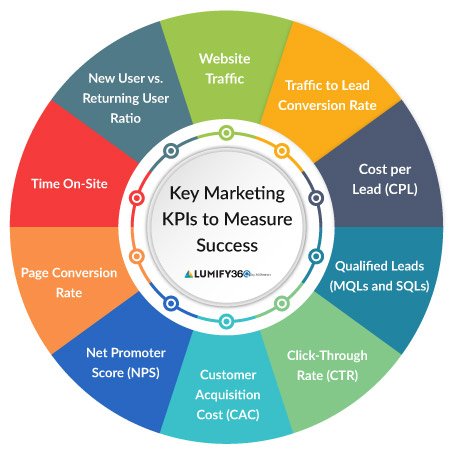
Introduction Marketing is no longer about simply publishing advertisements, posting on social media, or creating blog content and hoping that customers will respond. Modern marketing is increasingly data-driven. Businesses need to know what is working, what is not working, where customers are coming from, how much marketing activities cost, and whether those activities are contributing to business growth. This is where Marketing KPIs become important. Marketing KPIs help businesses measure performance using specific, trackable indicators. They can help marketers understand website traffic, engagement, leads, conversions, customer acquisition costs, revenue, advertising performance, email campaigns, SEO, social media, and many other areas. However, there is one important point to understand: Not every marketing metric is a KPI. A metric becomes a useful KPI when it is connected to an important business or marketing objective. For example, website traffic can be useful, but traffic alone does not necessarily mean that a business is growing. If a website receives thousands of visitors but generates very few qualified leads or sales, the business may need to investigate why. Similarly, a social media post may receive thousands of likes, but if the business objective is generating qualified leads, likes alone may not tell the complete story. The purpose of this guide is to explain Marketing KPIs in simple language and show how marketers can use them to make better data-informed decisions. What Are Marketing KPIs? KPI stands for Key Performance Indicator. A Marketing KPI is a measurable value used to evaluate whether a marketing activity or strategy is achieving a specific objective. In simple words: Marketing KPIs help you measure whether your marketing efforts are moving toward your goals. For example, suppose a company wants to generate 500 qualified leads in three months. The company could track: Number of leads Qualified leads Cost per lead Lead conversion rate Landing page conversion rate Customer acquisition cost Lead-to-customer rate These measurements help marketers understand how effectively their marketing strategy is performing. Why Are Marketing KPIs Important? Marketing without measurement can become difficult to manage. KPIs provide a framework for understanding performance. 1. KPIs Help Measure Progress Suppose your goal is to increase website leads by 30%. Without a KPI, you may not know whether you are getting closer to that goal. Lead volume and conversion rate can provide measurable indicators of progress. 2. KPIs Help Identify Problems Imagine your website traffic has increased significantly, but sales have not increased. That could indicate problems with: Website conversion Product positioning Pricing Landing pages Audience targeting Lead quality Sales follow-up KPIs can help identify where further investigation is needed. 3. KPIs Help Allocate Marketing Budgets Businesses often have limited marketing budgets. Performance data can help marketers understand which campaigns, channels, and activities are producing useful results. For example, a company may compare: SEO Google Ads Meta Ads Email marketing Content marketing Social media The goal is not simply to find the channel with the cheapest click. The goal is to understand which activities contribute to meaningful business outcomes. 4. KPIs Support Better Decision-Making Marketing teams can use KPI data to test assumptions and make decisions based on evidence. Instead of saying: “This campaign feels successful.” You can ask: “Did this campaign generate qualified leads at an acceptable cost?” That is a much more useful business question. KPI vs Metric: What Is the Difference? The terms metric and KPI are sometimes used interchangeably, but they are not exactly the same. A metric is a measurable data point. A KPI is a metric that has been selected because it is particularly important for evaluating progress toward a specific objective. For example: Metrics: Website sessions Page views Likes Impressions Clicks Possible KPIs: Qualified leads Revenue generated Customer acquisition cost Conversion rate Return on advertising spend The same metric can be important in one situation and less important in another. How to Choose the Right Marketing KPIs Choosing KPIs should begin with your goals. A simple framework is: Business Goal → Marketing Objective → KPI → Target → Measurement → Optimization For example: Business Goal: Increase revenue Marketing Objective: Generate more qualified customers KPIs: Qualified leads Lead-to-customer rate Customer acquisition cost Revenue Marketing ROI This approach keeps measurement connected to business outcomes. SMART Marketing Goals Marketing KPIs work better when goals are clearly defined. One common framework is SMART: Specific Measurable Achievable Relevant Time-bound Instead of: “Increase website traffic.” A clearer goal might be: “Increase organic website sessions by 25% over the next six months.” Now you have a specific objective and a measurable timeframe. The Most Important Marketing KPI Categories Marketing KPIs can be divided into several categories: Awareness KPIs Website KPIs SEO KPIs Content marketing KPIs Social media KPIs Paid advertising KPIs Lead generation KPIs Conversion KPIs Email marketing KPIs E-commerce KPIs Customer KPIs Revenue KPIs ROI and profitability KPIs Let’s examine each category. Part 1: Brand Awareness KPIs Brand awareness KPIs measure how effectively marketing activities are helping people discover and recognize a business. 1. Impressions An impression represents an instance in which content or an advertisement is displayed. For example, if an advertisement is displayed 10,000 times, it can generate 10,000 impressions. Impressions help measure exposure. However, impressions alone do not tell you whether people engaged with the advertisement or became customers. 2. Reach Reach represents the number of unique people who were exposed to content or advertising within a particular measurement context. Reach is different from impressions. For example: Reach: 5,000 people Impressions: 12,000 This could mean that the content was shown multiple times to some users. 3. Brand Search Volume Brand search volume measures how often people search for your brand name or branded terms. An increase in branded searches can sometimes indicate increased awareness, although it should be interpreted alongside other data. For example, a business may track searches for: Company name Product name Brand + service Brand + location 4. Share of Voice Share of voice attempts to measure how visible your brand is compared with competitors within a defined market, channel, or advertising environment. It

Marketing KPIs: The Complete Guide to 50+ Key Marketing Metrics Every Marketer Should Track Read More »

lead generation

Lead Generation: A Complete Beginner’s Guide to Getting More Customers

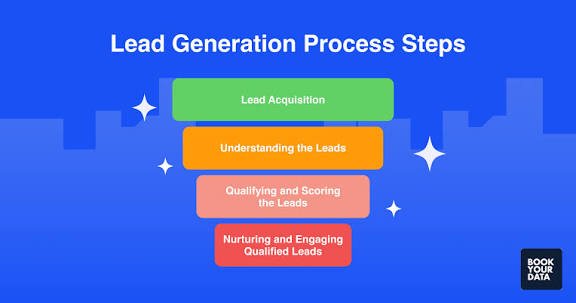
Introduction Every business needs customers to grow. But before someone becomes a customer, they usually go through several stages. They may discover your brand, visit your website, follow you on social media, read your content, or contact your business before finally making a purchase. This is where lead generation becomes important. Lead generation is the process of attracting people who may be interested in your products or services and encouraging them to provide their contact information or take a valuable action. These people are called leads. For example, someone visits your website and fills out a contact form to ask about your digital marketing services. That person can become a lead. Lead generation is an important part of digital marketing because it helps businesses build relationships with potential customers instead of relying only on random website visitors. In this beginner-friendly guide, you will learn what lead generation is, how it works, different types of leads, lead generation strategies, tools, common mistakes, and how to create a simple lead generation system for your business. What Is Lead Generation? Lead generation is the process of attracting potential customers and encouraging them to show interest in a business, product, or service. A lead can be someone who: Fills out a contact form Requests a quote Subscribes to an email newsletter Downloads an ebook Books a consultation Calls a business Sends a message Registers for a webinar Creates an account Requests product information The goal of lead generation is not necessarily to make an immediate sale. Instead, the goal is to identify people who may have a genuine interest in what your business offers and move them toward becoming customers. What Is a Lead? A lead is a person or organization that has shown some level of interest in your business. For example, imagine you run a website design agency. A visitor comes to your website and reads your services page. They then complete a form saying: “I need a website for my business. Please contact me.” That visitor is now a potential lead. However, not every lead has the same level of interest. Some people may be ready to buy immediately, while others may simply be researching their options. This is why businesses often classify leads based on their level of interest and buying readiness. Why Is Lead Generation Important? Lead generation is important because businesses need a consistent way to attract potential customers. Without lead generation, a business may depend heavily on: Word-of-mouth referrals Random website visitors Existing customers Walk-in customers Unpredictable sales opportunities A structured lead generation strategy can create a more consistent flow of potential customers. Benefits of lead generation include: More potential customers Better sales opportunities Increased brand awareness Improved customer relationships Better marketing measurement More predictable sales processes Opportunities for long-term growth For small businesses, lead generation can be especially useful because it allows them to focus marketing efforts on people who have shown interest. How Does Lead Generation Work? A basic lead generation process can be divided into several steps. Step 1: Attract First, you attract potential customers through channels such as: Google Search SEO Social media Google Ads Meta Ads YouTube Email marketing Content marketing Referrals Step 2: Engage Once people discover your business, provide useful information that keeps them interested. Examples include: Blog posts Videos Guides Case studies Social media content Free resources Step 3: Capture Give visitors an opportunity to provide their information. For example: “Get Your Free Website Audit” The visitor clicks the button and fills out a form. Step 4: Qualify Not every lead is equally valuable. You can evaluate leads based on factors such as: Need Budget Location Business type Purchase timeline Service requirements Step 5: Nurture Some leads are not ready to purchase immediately. You can continue communicating with them through: Email Educational content Follow-up messages Webinars Product demonstrations Step 6: Convert Eventually, qualified leads may become customers. Types of Leads Understanding different types of leads can help businesses create better sales and marketing strategies. 1. Cold Leads Cold leads have limited awareness or interaction with your business. They may fit your target audience but have not shown strong buying intent. For example, someone who sees your social media advertisement for the first time could be considered a cold prospect. 2. Warm Leads Warm leads have already interacted with your business. They may have: Visited your website Followed your social media account Downloaded content Watched your videos Subscribed to your email list They may be more familiar with your brand than cold prospects. 3. Hot Leads Hot leads have shown strong buying intent. Examples include people who: Request a quotation Book a consultation Ask about pricing Contact your sales team Add a product to their cart Request a product demonstration These leads may be closer to making a purchase. Marketing Qualified Leads A Marketing Qualified Lead, commonly called an MQL, is a lead that meets certain criteria established by a business and is considered sufficiently engaged for further marketing or sales attention. For example, a person might: Visit your website several times. Read multiple articles. Download a guide. Subscribe to your email list. Visit your pricing page. Based on your business’s criteria, that person may become an MQL. Sales Qualified Leads A Sales Qualified Lead, or SQL, is a lead that has been identified as being suitable for direct sales follow-up according to a business’s criteria. For example, a company may consider a lead sales-qualified if they: Have a clear business need Have an appropriate budget Are interested in purchasing Have requested a sales conversation The exact definition varies from business to business. Best Lead Generation Strategies There are many ways businesses can generate leads online. 1. Search Engine Optimization SEO can help your website appear in organic search results when potential customers search for relevant information. For example, a web design company could create content around: Website design for small businesses How much does a business website cost? Best website design practices How to create a business website

Lead Generation: A Complete Beginner’s Guide to Getting More Customers Read More »

google ads

Google Ads for Beginners: A Complete Guide to Google Advertising

Introduction In today’s competitive digital world, businesses need more than just a website to attract customers. They need to reach the right people at the right time. This is where Google Ads can help. Google Ads is one of the most popular online advertising platforms. It allows businesses to display advertisements across Google Search, YouTube, websites, apps, Google Maps, and other Google properties. For example, if someone searches for “best digital marketing agency near me,” businesses can use Google Ads to appear prominently in the search results when relevant. Google Ads can be useful for small businesses, startups, e-commerce stores, service providers, freelancers, and large companies. However, getting good results requires proper keyword research, targeting, ad creation, budgeting, and continuous optimization. In this beginner-friendly guide, you will learn what Google Ads is, how it works, its different campaign types, important terms, benefits, costs, and how to create your first campaign. What Is Google Ads? Google Ads is an online advertising platform developed by Google. Businesses use it to promote their products and services to people who are searching for information, products, or services online. Google Ads works primarily on an auction system. Advertisers choose keywords, audiences, locations, and other targeting options and compete for available advertising placements. For example, imagine you run a web design business. A potential customer searches: “website designer for small business” If you have created a relevant Google Ads campaign, your advertisement may appear when that person searches for the service. You generally pay when someone interacts with your advertisement, depending on the campaign and bidding model you choose. How Does Google Ads Work? Google Ads may look complicated at first, but the basic process is straightforward. Step 1: Choose Your Goal First, decide what you want your advertising campaign to achieve. Common goals include: Getting website traffic Generating leads Increasing sales Getting phone calls Promoting an app Increasing brand awareness Getting store visits Your goal should influence your campaign type, targeting, advertising message, and measurement. Step 2: Choose Your Audience Next, decide who you want to reach. You can use targeting options such as: Location Language Search behavior Interests Demographics Devices Audiences Keywords For example, a local digital marketing agency may target people searching for marketing services within a specific city or service area. Step 3: Select Keywords For Search campaigns, keywords are extremely important. Keywords are words or phrases that people type into search engines. Examples: digital marketing agency SEO services website design company Google Ads agency social media marketing services Selecting relevant keywords helps your advertisements reach people who are more likely to be interested in your offer. Step 4: Create Your Advertisement Your advertisement should clearly explain: What you offer Why customers should consider your business What makes your service different What action the user should take For example: Headline: Professional Digital Marketing Services Description: Grow your online presence with SEO, Google Ads, social media marketing, and website solutions. CTA: Get Started Today Step 5: Set Your Budget You decide how much you are willing to spend. Your budget can be controlled according to your business requirements. For example, a small business might begin with a limited daily budget and increase spending after identifying campaigns that produce useful results. Step 6: Launch and Optimize After your campaign goes live, monitor its performance. Look at metrics such as: Clicks Impressions CTR CPC Conversions Conversion rate Cost per conversion Return on ad spend Use these insights to improve your campaigns over time. Types of Google Ads Campaigns Google Ads offers different campaign types for different marketing goals. 1. Search Ads Search Ads appear on Google Search when people search for relevant products, services, or information. For example: “best SEO agency” A business offering SEO services can create a Search campaign targeting relevant searches. Search Ads can be particularly useful for reaching people who are actively looking for a product or service. 2. Display Ads Display Ads appear across websites and apps that are part of Google’s advertising network. They commonly use visual formats such as: Images Banners Responsive advertisements Display advertising can be useful for building awareness, reaching audiences, and remarketing to previous visitors. 3. YouTube Ads YouTube is part of Google’s advertising ecosystem, allowing advertisers to promote video content to relevant audiences. Businesses can use YouTube advertising for: Brand awareness Product promotion Educational videos Lead generation Remarketing A strong video advertisement can communicate a product or service quickly and visually. 4. Shopping Ads Shopping Ads are designed primarily for businesses that sell products online. They can display information such as: Product image Product name Price Store information For e-commerce businesses, Shopping campaigns can help users discover products while searching online. 5. App Campaigns App campaigns help businesses promote mobile applications. They can be used to encourage people to: Install an app Engage with an app Take specific actions inside an app These campaigns can be useful for businesses whose products or services depend on mobile applications. 6. Performance Max Campaigns Performance Max campaigns allow advertisers to access multiple Google advertising channels through a single campaign. Depending on the campaign setup, ads can reach users across Google’s available advertising inventory. This campaign type uses automation and Google’s machine-learning systems to help optimize campaign performance based on the advertiser’s selected goals. What Are Google Ads Keywords? Keywords are one of the most important concepts in Google Search advertising. A keyword represents a search term or topic that you want your advertisement to be relevant to. For example, if you provide website design services, relevant keywords might include: website design services website designer professional website design business website developer website development services However, choosing keywords simply because they have high search volume is not always the best strategy. You should also consider: Search intent Competition Relevance Cost Potential conversion value Understanding Search Intent Search intent means understanding why someone is searching. Consider these searches: “what is SEO” The user is probably looking for information. “SEO agency near me” The user may be looking for a

Google Ads for Beginners: A Complete Guide to Google Advertising Read More »

Digital Marketing Strategy

Digital Marketing Strategy: A Complete Beginner’s Guide

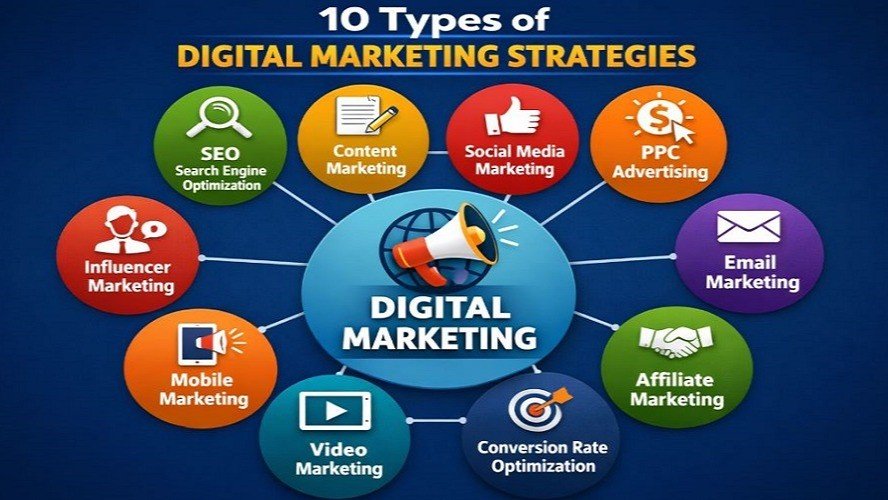
In today’s digital world, simply having a website or posting regularly on social media is not enough to grow a business. To achieve meaningful results online, businesses need a clear and well-planned digital marketing strategy. A digital marketing strategy helps you decide who your target audience is, what goals you want to achieve, which marketing channels you should use, what type of content you should create, how much you should spend, and how you will measure your results. Whether you are a beginner, small business owner, freelancer, blogger, startup founder, or aspiring digital marketer, learning how to create a digital marketing strategy is an essential skill. In this guide, you will learn what a digital marketing strategy is, why it matters, and how to create one step by step. What Is a Digital Marketing Strategy? A digital marketing strategy is a structured plan that uses digital channels and marketing techniques to achieve specific business goals. Digital marketing channels can include: Search engines Websites Social media Email marketing Online advertising Content marketing Video platforms Mobile applications The purpose of a digital marketing strategy depends on the business. Common goals include: Increasing brand awareness Generating website traffic Getting more leads Increasing sales Building an online audience Improving customer retention Increasing brand visibility Simple Example Imagine that you run a digital marketing agency. Your marketing strategy might look like this: SEO → Website Traffic → Helpful Content → Lead Form → Consultation → Customer In this example, every marketing activity supports a larger business objective. Why Is a Digital Marketing Strategy Important? Without a strategy, businesses may publish random social media posts, run advertisements without clear objectives, or create content without understanding their audience. A well-planned strategy gives your marketing activities direction. 1. Helps You Set Clear Goals A strategy helps you define exactly what you want to achieve through digital marketing. 2. Helps You Reach the Right Audience Audience research allows you to create content and campaigns that are relevant to potential customers. 3. Helps You Manage Your Budget A strategy helps you decide how much to invest in SEO, content marketing, social media, advertising, and other activities. 4. Makes Performance Easier to Measure You can use analytics and KPIs to understand whether your marketing activities are producing the desired results. 5. Creates Consistency A strategy helps you maintain a consistent approach across your website, social media channels, email campaigns, and advertising. Step 1: Define Your Business Goals The first step in creating a digital marketing strategy is to define your goals. Ask yourself: What do I want to achieve through digital marketing? Your goals could include: Increasing website traffic Generating more leads Increasing online sales Building brand awareness Growing an email list Attracting local customers Increasing product or service inquiries Try to make your goals specific and measurable. Instead of saying: “I want to grow my website.” You could create a more specific goal such as: “I want to increase organic website traffic over the next six months.” A clear goal makes it easier to track progress and evaluate performance. Step 2: Identify Your Target Audience Your marketing strategy becomes much more effective when you understand who you are trying to reach. Your target audience may be defined by factors such as: Age Location Profession Interests Needs Problems Buying behavior Income range Preferred platforms Example Suppose you provide graphic design services. Your potential target audience could include: Small business owners Startups Bloggers E-commerce businesses Local businesses Content creators Understanding your audience helps you create more relevant content, offers, and advertising campaigns. Step 3: Create a Buyer Persona A buyer persona is a research-based profile representing an ideal customer. For example: Buyer Persona Name: Rahul Age: 28 Profession: Small Business Owner Location: Delhi NCR Main Problem: Not getting enough website traffic or leads Goal: Increase online customers Preferred Platforms: Google, Instagram, and YouTube A buyer persona helps you understand the type of person you are creating your marketing for. If your business serves multiple customer groups, you can create more than one buyer persona. Step 4: Analyze Your Competitors Competitor research is another important part of a digital marketing strategy. Analyze your competitors’: Websites Blog content SEO strategies Social media profiles Content formats Advertising campaigns Offers Customer reviews Keywords Landing pages The goal is not to copy your competitors. Instead, competitor research helps you understand the market and identify opportunities. Questions to Ask What topics are competitors writing about? What keywords are they targeting? Which social platforms are they using? What type of content receives engagement? What problems are they solving? Are there topics they are not covering? How can you provide more useful information? This research can help you develop a stronger content and marketing plan. Step 5: Choose the Right Digital Marketing Channels You do not need to be active on every digital platform. The right channels depend on your audience, business goals, resources, and industry. Some major digital marketing channels include: Search Engine Optimization SEO helps businesses improve their visibility in organic search results. Content Marketing Content marketing uses useful and relevant content to attract and educate an audience. Social Media Marketing Social media can help businesses build awareness, engage audiences, and promote products or services. Email Marketing Email marketing allows businesses to communicate with subscribers and customers. Paid Advertising Platforms such as Google Ads and Meta Ads can help businesses reach targeted audiences through paid campaigns. Local Marketing Local businesses can use digital channels to improve visibility among customers in specific geographic areas. Choose channels based on where your target audience is and what your business can consistently manage. Step 6: Build an SEO Strategy SEO can be an important part of a digital marketing strategy, especially for businesses that want to build long-term organic visibility. An SEO strategy can include: Keyword research Search intent analysis Content planning On-page SEO Internal linking Technical SEO Link building Performance monitoring Keyword Research Start by identifying the terms your target audience searches for. For example: Digital marketing for beginners SEO

Digital Marketing Strategy: A Complete Beginner’s Guide Read More »

digital marketing terminology cheat sheet

Digital Marketing Terminology Every Beginner Should Know

Digital marketing ki duniya mein enter karte hi beginners ko bahut saare naye words aur abbreviations sunne ko milte hain—SEO, SEM, CPC, CTR, CTA, ROI, PPC, SERP, conversion, engagement aur bahut kuch. Agar aap in terms ko samajh nahi paate, to digital marketing campaigns ko understand karna aur effectively manage karna difficult ho sakta hai. Is guide mein hum important digital marketing terminology ko simple language mein explain karenge. Chahe aap student hain, business owner hain, blogger hain, freelancer hain ya digital marketing seekhna shuru kar rahe hain, ye terminology aapko digital marketing ki basic language samajhne mein help karegi. What Is Digital Marketing Terminology? Digital marketing terminology ka matlab un common words, abbreviations aur concepts se hai jo online marketing mein frequently use hote hain. For example: SEO = Search Engine Optimization PPC = Pay-Per-Click CTR = Click-Through Rate CPC = Cost Per Click CTA = Call to Action ROI = Return on Investment SERP = Search Engine Results Page In terms ko samajhna digital marketing seekhne ka important first step hai. 1. Digital Marketing Digital marketing internet aur digital channels ke through products, services ya brands ko promote karne ki process hai. Ismein websites, search engines, social media, email, online advertising aur content jaise channels use kiye ja sakte hain. Example: Agar ek clothing business Instagram par products promote karta hai, Google par ads chalata hai aur SEO ke through website traffic generate karta hai, to ye digital marketing ka example hai. 2. SEO – Search Engine Optimization SEO ka full form Search Engine Optimization hai. SEO ka goal website aur content ko search engines ke liye better banana hai, taaki relevant searches mein website appear ho sake. SEO ke major areas hain: On-page SEO Off-page SEO Technical SEO Keyword research Content optimization Example: Aapka blog agar “best digital marketing tips for beginners” keyword ke liye optimized hai, to aap relevant Google searches se organic visitors attract karne ki koshish kar sakte hain. 3. SERP – Search Engine Results Page SERP ka full form Search Engine Results Page hai. Jab koi user Google ya kisi search engine mein query enter karta hai, jo results page dikhta hai use SERP kaha jata hai. SERP mein different types ke results ho sakte hain: Organic results Paid advertisements Featured snippets Images Videos Local results People Also Ask SEO ka objective relevant searches mein organic visibility improve karna hota hai. 4. Keyword A keyword wo word ya phrase hota hai jo users search engine mein type karte hain. Examples: digital marketing digital marketing course SEO for beginners best SEO tools social media marketing Keywords SEO aur paid search advertising dono mein important role play kar sakte hain. 5. Keyword Research Keyword research ka matlab relevant search terms identify karna hai jinhe target audience search kar sakti hai. Keyword research karte waqt marketers generally consider karte hain: Search intent Search volume Competition Relevance Business value Good keyword research aapko useful content topics identify karne mein help kar sakti hai. 6. Search Intent Search intent ka matlab hai user ke search karne ke peeche ka purpose. Common search intent types include: Informational Intent User information chahta hai. Example: What is SEO? Navigational Intent User kisi specific website ya page ko find karna chahta hai. Example: Google Search Console Commercial Investigation User options compare kar raha hota hai. Example: Best SEO tools for beginners Transactional Intent User action ya purchase ke close hota hai. Example: Buy SEO software Search intent samajhna useful content create karne ke liye important hai. 7. On-Page SEO On-page SEO website ke pages ke andar ki optimization ko refer karta hai. Important elements include: Title tag Meta description Headings Content Keywords Internal links Image optimization URL structure Example ke liye, agar aap “SEO for Beginners” article likh rahe hain, to page title, headings aur content ko topic ke according optimize karna on-page SEO ka part hai. 8. Off-Page SEO Off-page SEO website ke bahar hone wali activities ko refer karta hai jo website ki online authority aur visibility support kar sakti hain. Examples: Backlinks Digital PR Brand mentions Relevant partnerships Content promotion Backlinks off-page SEO ka commonly discussed component hain. 9. Technical SEO Technical SEO website ke technical aspects ko improve karne par focus karta hai. Important areas include: Website crawling Indexing Site structure Mobile usability Page performance HTTPS Structured data XML sitemap Technical SEO ka purpose search engines ko website ko efficiently understand aur access karne mein help karna hai. 10. Backlink A backlink tab hota hai jab another website aapki website ke kisi page ko link karti hai. Example: Aap digital marketing par article publish karte hain aur kisi relevant website ne us article ko reference karte hue link diya. Backlinks SEO mein important ho sakte hain, lekin quality aur relevance matter karti hai. Har backlink automatically valuable nahi hota. 11. Content Marketing Content marketing valuable aur relevant content create aur distribute karne ki strategy hai. Content formats include: Blog posts Videos Infographics E-books Case studies Social media posts Podcasts Guides Content marketing ka purpose audience ko attract, educate aur engage karna ho sakta hai. 12. CTA – Call to Action CTA ka full form Call to Action hai. CTA user ko next step lene ke liye encourage karta hai. Examples: Buy Now Contact Us Learn More Download Guide Subscribe Now Get Started Example: “SEO ke baare mein aur learn karna chahte hain? Complete SEO Guide padhein.“ Yahan “Complete SEO Guide padhein” CTA ki tarah work karta hai. 13. Landing Page Landing page ek specific web page hota hai jo generally particular marketing campaign ya objective ke liye design kiya jata hai. For example, Google Ads campaign ke liye ek dedicated landing page banaya ja sakta hai jahan visitor: Product details dekhe Form fill kare Demo request kare Purchase kare Contact kare A good landing page usually clear message aur strong CTA rakhta hai. 14. Conversion Conversion tab hota hai jab visitor koi desired action complete karta hai. Conversion business ke goal ke according different ho sakta hai.

Digital Marketing Terminology Every Beginner Should Know Read More »

What Is AI

What Is AI, Machine Learning, Generative AI, and LLMs? A Complete Beginner’s Guide

Artificial Intelligence has become one of the most important technologies of the modern digital world. From search engines and recommendation systems to chatbots, self-driving technologies, image generators, business automation, and digital assistants, AI is increasingly becoming part of everyday life. However, for someone who is just starting to learn about artificial intelligence, the terminology can be confusing. You may have heard terms such as Artificial Intelligence (AI), Machine Learning (ML), Deep Learning, Generative AI, Large Language Models (LLMs), Natural Language Processing (NLP), neural networks, prompts, tokens, AI models, training data, and automation.   What do all these terms mean? Are AI and Machine Learning the same thing? Is ChatGPT an AI or an LLM? What exactly is Generative AI? How does an AI model learn? What is a prompt? What are tokens? This complete beginner’s guide explains these concepts in simple language. By the end of this article, you should have a much clearer understanding of the AI ecosystem and the terminology used in modern artificial intelligence. Table of Contents What Is Artificial Intelligence? How Does AI Work? Examples of AI in Everyday Life Types of Artificial Intelligence What Is Machine Learning? How Machine Learning Works Types of Machine Learning What Is Deep Learning? What Are Neural Networks? AI vs Machine Learning vs Deep Learning What Is Generative AI? How Generative AI Works Examples of Generative AI What Are Large Language Models? How LLMs Work Chatbots vs LLMs What Is Natural Language Processing? What Is Computer Vision? What Is an AI Model? What Is Training Data? What Is a Dataset? What Is an Algorithm? What Is a Prompt? What Is Prompt Engineering? What Are Tokens? What Are Parameters? What Is an AI Inference? What Is Fine-Tuning? What Is RAG? What Are AI Hallucinations? What Is an AI Agent? What Is AI Automation? What Is an AI API? What Is an AI Assistant? What Is Multimodal AI? What Is Speech Recognition? What Is Text-to-Speech? What Is Image Generation? What Is AI Video Generation? What Is Reinforcement Learning? What Is Reinforcement Learning From Human Feedback? What Is Supervised Learning? What Is Unsupervised Learning? What Is Classification? What Is Regression? What Is Clustering? What Is Computer-Generated Content? AI Bias AI Safety AI Ethics AI Privacy AI Security Responsible AI AI vs Automation AI vs Traditional Software Benefits of AI Limitations of AI Common AI Myths AI in Digital Marketing AI in Business AI in Education AI in Healthcare AI in Finance AI in Customer Service AI in Content Creation AI in SEO AI Skills for Beginners How Beginners Can Start Learning AI AI Terminology Cheat Sheet Conclusion 1. What Is Artificial Intelligence? Artificial Intelligence, commonly called AI, is a field of computer science focused on creating computer systems that can perform tasks that normally require some form of human intelligence. These tasks can include: Understanding language Recognizing images Identifying patterns Making predictions Solving problems Generating content Making recommendations Understanding speech Supporting decision-making Interacting with users In simple terms: AI is technology that enables computers to perform tasks that appear intelligent. For example, when a navigation application recommends the fastest route, an AI-powered recommendation system suggests a movie, or a chatbot answers a question, artificial intelligence may be involved. AI does not necessarily mean that a computer thinks exactly like a human. Instead, AI systems are designed to perform particular tasks using algorithms, data, models, and computational resources. 2. How Does AI Work? At a basic level, an AI system works by using: Data + Algorithms + Computing Power + Models = AI System Data provides information. Algorithms provide methods for processing that information. Computing power allows systems to perform large numbers of calculations. Models represent patterns learned from data. Consider an AI system designed to recognize cats in photographs. The system may be trained using thousands or millions of images containing cats and other objects. During training, the model learns statistical patterns associated with cats. Later, when a new photograph is provided, the system analyzes the image and generates a prediction. The important point is that the AI system generally does not memorize one simple definition of a cat. Instead, it learns patterns from examples. 3. Examples of AI in Everyday Life You may already use AI every day without realizing it. Search Engines Search engines use sophisticated algorithms and machine-learning systems to understand queries and return relevant information. Recommendation Systems Streaming services, shopping websites, and social platforms can recommend content based on patterns in user behavior. Smartphones Modern smartphones use AI for features such as: Face recognition Voice assistants Camera enhancement Spam detection Predictive text Email Email platforms can use AI to identify spam, categorize messages, and assist with writing. Maps Navigation systems can analyze traffic and other information to estimate travel times and recommend routes. Customer Service Businesses increasingly use AI-powered chatbots to answer frequently asked questions. Content Creation Generative AI systems can help users create: Articles Images Videos Audio Presentations Code AI is therefore not limited to robots or science-fiction applications. It is already integrated into many ordinary digital experiences. 4. Types of Artificial Intelligence AI can be categorized in several different ways. One common conceptual classification is: Artificial Narrow Intelligence Artificial Narrow Intelligence, often called narrow AI, refers to systems designed to perform specific tasks. Examples include: Spam filters Recommendation systems Image classifiers Translation systems Voice recognition systems Most AI systems used today fall into this broad category. Artificial General Intelligence Artificial General Intelligence, or AGI, generally refers to a hypothetical form of AI capable of performing a broad range of intellectual tasks at a level comparable to humans or beyond. AGI remains a major topic of research and debate. Artificial Superintelligence Artificial Superintelligence is a hypothetical concept describing an AI system whose general intellectual capabilities substantially exceed those of humans. It is largely discussed as a future or theoretical possibility rather than an established technology. 5. What Is Machine Learning? Machine Learning, commonly abbreviated as ML, is a subfield of artificial intelligence. Instead of explicitly programming every

What Is AI, Machine Learning, Generative AI, and LLMs? A Complete Beginner’s Guide Read More »

website traffic analysis

Website Traffic Analysis: A Complete Guide to Understanding and Improving Website Traffic

In digital marketing, getting visitors to your website is only the first step. The real challenge is understanding who is visiting your website, where they are coming from, what they are doing, and whether they are taking valuable actions. This is where website traffic analysis becomes important. Website traffic analysis helps businesses, bloggers, marketers, and website owners understand how their websites are performing. By analyzing traffic data, you can identify your best traffic sources, discover popular pages, understand visitor behavior, measure marketing campaigns, and find opportunities for growth. Whether you are running an e-commerce store, business website, blog, portfolio, or digital marketing agency website, traffic analysis can help you make better decisions based on real data rather than assumptions. What Is Website Traffic Analysis? Website traffic analysis is the process of collecting, measuring, and analyzing data about visitors who come to a website. It involves studying different aspects of website activity, including: Number of visitors Traffic sources Most visited pages Visitor engagement Geographic locations Devices used by visitors New and returning users Landing pages Conversions Marketing campaign performance For example, suppose your website receives 10,000 visitors in one month. Simply knowing the number 10,000 does not tell you whether your website is successful. You also need to know where those visitors came from and what they did after arriving. Maybe 5,000 visitors came from Google Search, 2,000 came from social media, 1,500 came from direct traffic, and the remaining visitors came from referrals and paid campaigns. Website traffic analysis helps you understand these differences. Why Is Website Traffic Analysis Important? Website traffic analysis is important because it helps you understand the performance of your website and marketing strategy. Without analyzing your traffic, you may continue investing time and money in marketing activities without knowing what is actually working. Traffic analysis can help answer questions such as: How many people visit my website? Where do my visitors come from? Which pages attract the most visitors? Which keywords bring organic traffic? Which marketing channels generate leads? What devices do visitors use? How long do users engage with my content? Which pages generate conversions? Are my SEO efforts working? Which content should I create next? These insights can help you improve your website and develop a more effective digital marketing strategy. Types of Website Traffic Website traffic can come from many different sources. Understanding these sources is one of the most important parts of traffic analysis. 1. Organic Search Traffic Organic traffic comes from unpaid search engine results. For example, someone searches Google for: “best digital marketing strategies” They find your website in the search results and click on your page. That visit is generally considered organic search traffic. Organic traffic is particularly important for SEO-focused websites because it can indicate whether your content is attracting visitors through search engines. To improve organic traffic, businesses often focus on: Keyword research Quality content On-page SEO Technical SEO Internal linking Backlinks Search intent Website experience 2. Direct Traffic Direct traffic generally refers to visits where the source is not identified or where a user directly accesses your website. Examples can include users: Typing your website address Using a bookmark Returning through certain saved links Arriving through traffic where referral information is unavailable A strong direct-traffic presence can sometimes indicate brand familiarity, but the exact meaning depends on how analytics tracking is configured. 3. Referral Traffic Referral traffic comes from links on other websites. For example, imagine another website publishes an article about digital marketing and links to your blog. Someone clicks that link and visits your website. That visitor can be recorded as referral traffic. Referral traffic can be valuable because it may introduce your website to new audiences and can contribute to brand visibility. 4. Social Media Traffic Social traffic comes from social media platforms. Examples include visitors arriving from: Facebook Instagram LinkedIn X Pinterest YouTube Other social platforms Social media traffic can be especially useful for content marketers. For example, if you publish a blog post and promote it on LinkedIn, you can analyze whether that promotion generates website visits and conversions. 5. Paid Traffic Paid traffic comes from advertising campaigns. Examples include: Google Ads Meta Ads Display advertising Paid social campaigns Other online advertising platforms Paid traffic analysis helps advertisers understand whether their campaigns are generating useful results. Traffic volume alone is not enough. You should also analyze conversions, cost, engagement, and revenue where applicable. 6. Email Traffic Email traffic comes from links in email campaigns and newsletters. For example, a company sends an email promoting a new blog article. Users click the link and visit the website. Using proper campaign tracking can help marketers understand how email traffic contributes to website performance. Important Website Traffic Metrics Website traffic analysis involves many metrics. You don’t need to monitor every metric available. Instead, focus on measurements connected to your goals. Users Users represent visitors interacting with your website according to the analytics platform’s measurement methodology. This metric can help you understand the size of your audience over a selected period. Sessions A session represents a period of interaction with your website. Sessions can help you understand how frequently users visit and interact with your website. Page Views Page views show how many times pages were viewed. This can help identify popular content. For example, if your SEO guide receives significantly more page views than other blog posts, it may be worth creating related content. Engagement Rate Engagement rate helps you understand how actively visitors interact with your website. High traffic with poor engagement may indicate that visitors are not finding what they expected. Average Engagement Time This metric can provide insight into how much time users actively engage with your website or content. Longer engagement can sometimes indicate stronger interest, but the ideal value depends on the type of page. Conversion Rate Conversion rate measures the percentage of users or sessions that complete a desired action, depending on how it is calculated and configured. Examples of conversions include: Contact form submissions Purchases

Website Traffic Analysis: A Complete Guide to Understanding and Improving Website Traffic Read More »

Google Analytics Reports

Google Analytics Reports: A Complete Guide to Understanding Website Performance

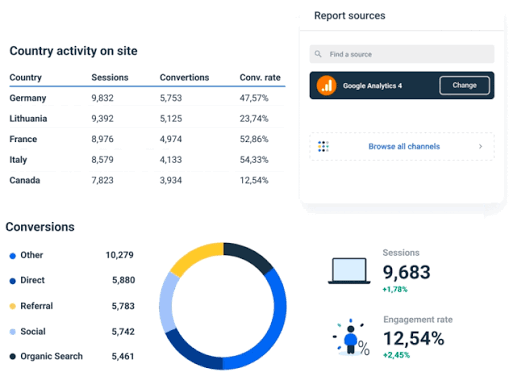
In digital marketing, understanding how visitors interact with your website is just as important as attracting them. Google Analytics reports help businesses, marketers, website owners, and agencies understand website traffic, user behavior, conversions, and marketing performance. Instead of guessing whether a marketing campaign is working, you can use analytics data to make informed decisions. Google Analytics provides valuable information about where visitors come from, which pages they visit, how long they stay, what actions they take, and whether they complete important goals. For businesses investing in SEO, Google Ads, social media marketing, content marketing, or email marketing, understanding Google Analytics reports can make marketing strategies more measurable and effective. What Are Google Analytics Reports? Google Analytics reports are organized views of website and app data collected through Google Analytics. They allow you to analyze different aspects of your online presence, including users, traffic sources, engagement, conversions, and revenue. Google Analytics 4 (GA4) is Google’s current analytics platform. It uses an event-based measurement model, which means user interactions such as page views, clicks, purchases, form submissions, and video engagement can be measured as events. For example, if someone visits your website through Google Search, reads a blog post, clicks a service button, and submits a contact form, analytics data can help you understand this journey. Why Are Google Analytics Reports Important? Google Analytics reports are important because they turn website activity into useful insights. They can help you answer questions such as: How many people are visiting my website? Where are my visitors coming from? Which pages are receiving the most traffic? Which marketing channels are generating visitors? Are users engaging with my content? Which pages lead to conversions? How many leads or purchases are being generated? Which campaigns are performing well? Which areas of my website need improvement? Without analytics, you may spend money on marketing without knowing which activities are actually contributing to your business goals. Main Types of Google Analytics Reports GA4 organizes reporting around different areas of measurement. The exact reports and navigation available can vary depending on your property’s setup and permissions. The most important reporting areas include: Reports snapshot Realtime Acquisition Engagement Monetization User attributes Tech User and business reporting features Let’s understand the most useful areas. 1. Realtime Report The Realtime report allows you to see activity happening on your website or app around the current time. It can help you understand whether tracking is working and see recent user activity. You may be able to analyze information such as: Active users Traffic sources Events Pages or screens being viewed User locations Recent conversions Realtime reporting is particularly useful after publishing a new campaign, blog post, advertisement, or website update. For example, if you publish a new article and share it on social media, you can check recent activity to see whether visitors are arriving from your promotion. 2. Acquisition Reports Acquisition reports show how users and sessions are acquired. This is one of the most important reporting areas for digital marketers because it helps identify traffic sources and marketing channels. Common acquisition dimensions include: Organic Search Direct Referral Organic Social Paid Search Email Other campaign traffic Organic Search Organic Search represents traffic generated through unpaid search engine results. If you are investing in SEO, monitoring organic traffic can help you understand whether search visibility is bringing users to your website. Direct Traffic Direct traffic generally represents visits where the traffic source is not identified or where users arrive directly. It can include users typing a URL into their browser, using bookmarks, or traffic where referral information isn’t available. Referral Traffic Referral traffic comes from links on other websites. For example, if another website links to your blog and someone clicks that link to visit your site, the visit may appear as referral traffic. Organic Social Organic Social can help you understand visits from unpaid social media activity when the traffic is correctly identified. This can be useful for measuring the impact of platforms such as Facebook, Instagram, LinkedIn, and other social networks. Paid Traffic Paid traffic can help you evaluate visitors generated by advertising campaigns. Proper campaign tracking is important when analyzing paid marketing performance. 3. Engagement Reports Engagement reports help you understand what visitors do after arriving on your website. Important measurements can include: Events Conversions Landing pages Pages and screens User engagement Engagement time Engagement data is useful because traffic volume alone does not tell you whether visitors find your website valuable. For example, a website may receive thousands of visitors but generate very few leads. Another website may receive fewer visitors but generate significantly more inquiries. This is why marketers should analyze both traffic and engagement. 4. Pages and Screens Report The Pages and Screens report helps you understand how individual pages perform. You can use it to identify: Popular pages Blog posts receiving traffic Service pages attracting visitors Pages with engagement Pages generating conversions For a digital marketing blog, this report can reveal which topics attract the most interest. For example, if articles about SEO consistently receive strong traffic, you could create additional content around: SEO tools Keyword research Technical SEO Local SEO SEO mistakes AI SEO Content optimization This creates a data-driven content strategy. 5. Landing Page Reports A landing page is the page where a user begins their website session. Landing page analysis is important because the first page a visitor sees can influence their next action. For example, a user may arrive directly on: yourwebsite.com/seo-guide You can then analyze whether visitors continue exploring your website, engage with the content, or complete a conversion. Landing-page data can help marketers identify pages that deserve optimization. 6. Events Report GA4 uses events to measure user interactions. Examples include: Page views Scrolls Clicks Video engagement File downloads Form interactions Purchases Sign-ups Events are particularly important because they allow businesses to measure actions instead of simply counting visits. For example, a digital marketing website may track: Contact Form Submitted as an important event. This provides more useful information than simply

Google Analytics Reports: A Complete Guide to Understanding Website Performance Read More »